You Need A Cash Plan is a Windows program.
You run it on a Mac - Intel or Apple silicon - with Parallels Desktop or a virtualization software of your choice.

Download
You run it on a Mac - Intel or Apple silicon - with Parallels Desktop or a virtualization software of your choice.
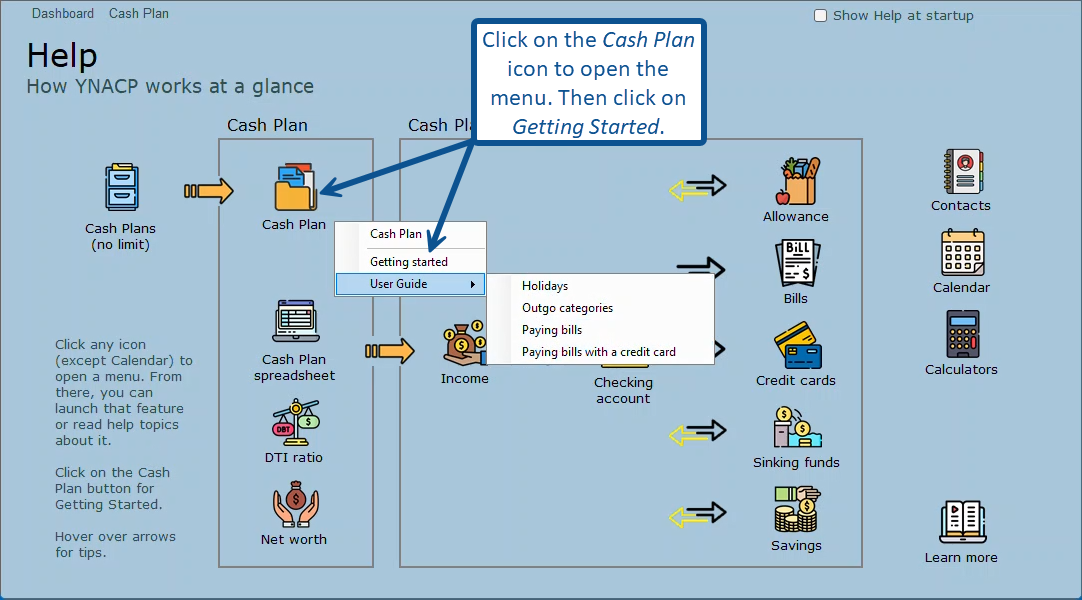
The first time you run the program the Help page is opened. To get started, click on the Cash Plan icon to open the menu and then click on Getting started.
Open the Options window (upper right corner) to change how the program handles your clicks on browser links and email addresses.
The first time you run the program the Help page is opened. To get started, click on the Cash Plan icon to open the menu and then click on Getting started.
Open the Options window (upper right corner) to change how the program handles your clicks on browser links and email addresses.